


Build and Install Debian 12 Bookworm
The Embedian Debian Linux SDK combines community‑supported Debian software with NXP‑specific components to deliver a convenient development solution on ARM64 platforms. Using Flexbuild, developers can generate BSP firmware (ATF, U‑Boot, OP‑TEE, kernel, DTB, peripheral firmware, initramfs), as well as Debian desktop and server RootFS images. Hardware‑accelerated modules for GPU, NPU, VPU, ISP, security, Wi‑Fi/Bluetooth, and audio are compiled against Debian runtime dependencies.
Flexbuild enables flexible builds of RootFS, kernel, BSP, and user applications across graphics, multimedia, networking, connectivity, security, and AI/ML use cases, supporting streamlined customization and CI/CD. With flex‑installer, distributions can be easily deployed to SD/eMMC or USB/SATA/NVMe storage. Embedian provides both source packages and prebuilt demo images to simplify evaluation and development.
OVERVIEW OF DEBIAN LINUX SDK | |
Distro Variant | • Debian Base (basic packages) • Debian Server (more packages without GUI Desktop) • Debian Desktop (with GNOME GUI Desktop besides the packages of Debian server) |
Deployment of the prebuilt Debian distro images | NXP provides a script tool flex-installer to automatically download and install the prebuilt BSP image and Debian RootFS image with customizable partitions of the target storage device. The entire disk space of the SD/eMMC card or USB/SATA disk is accessible with the formatted EXT4 partition. flex-installer can also convert the tarball images to a single .wic image. Optionally, you can use the balena Etcher tool to flash the BSP composite firmware into the SD card on the Windows host machine if the Linux host is not available. |
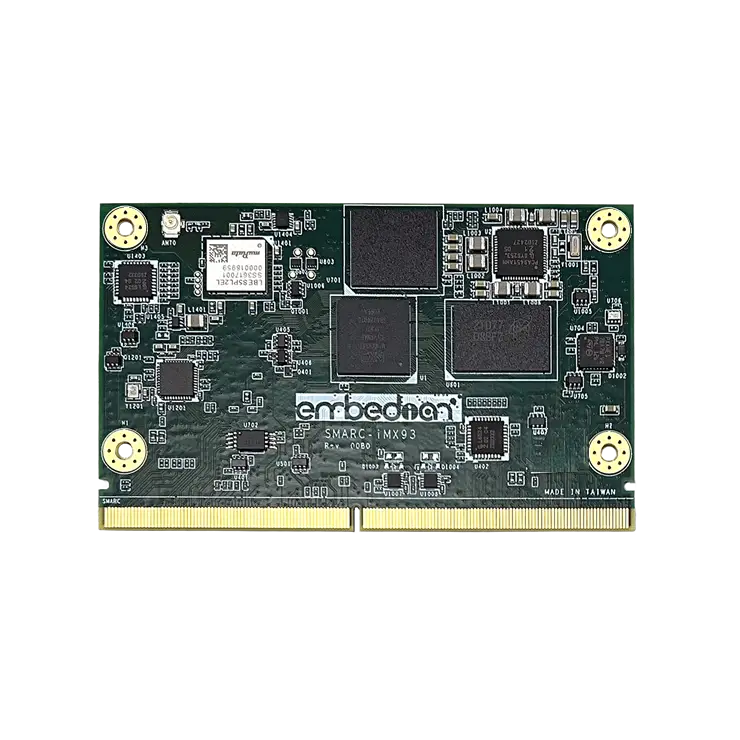
Supported boards | • SMARC-iMX93 • SMARC-iMX8QM • SMARC-iMX8MP • SMARC-iMX8MQ • SMARC-iMX8MM • pITX-MX8M-PLUS • OSM-iMX93-SF • pITX-OSM-iMX93 |
Host Requirement to build Debian Linux SDK with Flexbuild | • Debian 12. • Build in Docker hosted on Ubuntu 22.04 LTS or Ubuntu 24.04 LTS. |
Duration of build | 30 minutes – 3 hours. |
Consumed disk space | 30 GB – 50 GB. |
Installing a new package | Installing a package is as simple as running apt install <package> since there is a deb package manager for Debian. |
Patching source of component | It is easy to patch board-specific components in Flexbuild, but inconvenient to patch the upstream Debian package because they are installed as deb packages. |
Development Board
EVK-STD-CARRIER-S20 (universal carrier board for all SMARC 2.0 modules) from Embedian
Release Note
What is new in this release
The Debian Linux SDK 25.06 release has the following new features:
- Flexbuild upgraded to 2.18.2506.
- Debian 12.9 (base, desktop, server) RootFS with update.
- Linux kernel upgraded to LTS 6.6.52.
- GPU driver upgraded to imx-gpu-viv-6.4.11.p2.10-aarch64 (compiled based on Debian 12 runtime dependency).
- VPU driver upgraded to imx-vpu-hantro-vc-1.10.1 (based on Debian 12).
- Supports eIQ AI/ML and GoPoint Demos.
- DPDK L2FWD and L3FWD applications.
- GStreamer 1.24.7 and various plugins for i.MX.
Supported board features
- Debian 12 Weston Desktop by default, Gnome Desktop supported alternatively (no acceleration)
- Wi-Fi + Bluetooth
- eIQ TensorFlow Lite support
- Gstreamer support
- DPDK for networking acceleration
- GoPoint Demos support in both GUI and TUI mode
Building Debian Images with Flexbuild
Flexbuild is a component-oriented lightweight build system and integration platform with capabilities of flexible, ease-to-use, scalable system building, and Distro deployment, developed by NXP.
Flexbuild provides a set of scripts, tools, and make files to compile NXP board-specific driver components, create board-specific BSP composite firmware, boot image, and custom Debian (base, desktop, server) RootFS image. It provides an easy way to create a full-fledged Debian Distro with hardware-accelerated components for NXP platforms, using a single command. Once the image is built, users can directly deploy it onto an SD card.
Build Environment
Host prerequisites to build the Debian Distro:
Debian 12, Ubuntu 22.04, or Ubuntu 24.04 with Docker installed.
Perform the following steps to install the Docker:
$ sudo apt install docker.io
Users must have the sudo permission for Docker commands or be added to the Docker group as follows.
Change the current group to ”docker”, and add the account to it and restart the Docker service.
$ sudo newgrp – docker
$ sudo usermod -aG docker <accountname>
$ sudo gpasswd -a <accountname> docker
$ sudo service docker restart
Getting Flexbuild
Run the following command to clone the repository:
$ git clone https://github.com/embedian/flexbuild.git -b lsdk2506
The following is the source tree of the Flexbuild repository structure.
├── LICENSE-Flexbuild-BSD-3-CLAUSE.txt
├── LICENSE_SDK.txt
├── README.md
├── SCR.txt
├── build_lsdk2506
│ ├── apps
│ ├── bsp
│ ├── images
│ ├── linux
│ └── rfs
├── components_lsdk2506
│ ├── apps
│ └── linux
├── configs
│ ├── board
│ ├── buildroot
│ ├── debian
│ ├── linux
│ ├── ml.yml
│ ├── poky
│ ├── sdk-emb.yml
│ └── sdk.yml
├── docker
│ ├── debian
│ └── ubuntu
├── docs
│ ├── FAQ-add-new-package-and-board.md
│ ├── FAQ-docker-setup.md
│ ├── build_and_deploy_distro.md
│ ├── flexbuild_usage.md
│ ├── flexbuild_workflow.txt
│ ├── host_requirement.md
│ ├── memory_layout.txt
│ ├── nxp_linux_sdk.md
│ └── proxy.md
├── include
│ ├── repo.mk
│ └── repo_update.inc
├── logs
├── patch
│ ├── apitrace
│ ├── atf
│ ├── cheese
│ ├── clutter_gst
│ ├── cogl
│ ├── cryptodev_linux
│ ├── gst_plugins_bad
│ ├── gst_plugins_base
│ ├── gst_plugins_good
│ ├── gstreamer
│ ├── gtec_demo_framework
│ ├── imx_demo_experience
│ ├── imx_demos_list
│ ├── imx_firmware
│ ├── imx_gst_plugin
│ ├── imx_mkimage
│ ├── imx_smart_kitchen
│ ├── imx_voiceplayer
│ ├── linux
│ ├── nnstreamer
│ ├── openssl
│ ├── optee_os
│ ├── uboot
│ ├── vkmark
│ ├── vpp
│ ├── wayland
│ └── weston
├── setup.env
├── src
│ ├── Makefile
│ ├── apps
│ ├── bsp
│ ├── linux
│ └── system
└── tools
├── bld -> flex-builder
├── chroot.sh
├── clean_components
├── create_bootpartition
├── create_composite_firmware
├── distro_buildroot
├── distro_debian
├── distro_poky
├── flash_images
├── flex-builder
├── flex-installer
├── getvariable
├── make_emmc
├── parse_yaml
├── repo_update
├── resizerfs
└── secure_sign_image
Building Debian images in Flexbuild
Run the following commands for the first time to set up the build environment.
$ cd flexbuild
$ . setup.env (in host environment)
$ bld docker (create or attach to docker)
$ . setup.env (in docker environment)
$ bld host-dep (install host dependent packages)
$ export LOG_LEVEL=0 (Optional, enable detailed log. The default value is 2, which means ”mute all possible log”.)
Flexbuild usage:
$ bld -m <machine>
or
$ bld <target> [<option>]
Notes
machine name for Embedian SMARC-iMX93 platform are imx93-smarc-2g or i.mx93-smarc-1g.
Automatically build BSP composite firmware + kernel + iMX-specific driver
components + Debian RootFS
$ bld -m imx93-smarc-2g
$ bld -m imx93-smarc-1g
Most used example with separate build:
Notes
$ bld uboot -m imx93-smarc-2g
(compile u-boot image for imx93-smarc-2g)
$ bld atf -m imx93-smarc-2g -b sd
(compile ATF image for SD boot on imx93-smarc-2g)
$ bld linux
(compile linux kernel for all arm64 i.MX machines)
$ bld linux:menuconfig
(customize kernel config options in menu)
$ bld boot
(generate boot partition tarball including kernel, dtb, modules, distro bootscript for iMX machines)
$ bld bsp -m imx93-smarc-2g
(generate BSP firmware including atf, u-boot, optee_os, kernel, dtb, peripheral-
firmware,initramfs)
$ bld rfs -r debian:desktop
(generate Debian desktop rootfs with more graphics and multimedia packages for
GUI Desktop)
$ bld rfs -r debian:server
(generate Debian server rootfs with server related packages, no GUI Desktop)
$ bld rfs -r debian:base
(generate Debian base rootfs with base packages)
$ bld apps -r debian:server
(compile iMX-specific apps against runtime dependencies of Debian server RootFS)
$ bld merge-apps
(merge iMX-specific apps into target Debian desktop RootFS)
$ bld merge-apps -r debian:server
(merge iMX-specific apps into target Debian server RootFS)
$ bld packrfs
(pack and compress target rootfs as rootfs_lsdk_debian_desktop_arm64.tar.zst)
$ bld packapps
(pack and compress target app components as apps_arm64_debian_desktop.tar.zst)
$ bld list
(list enabled machines and supported components)
$ bld docker
(create or attach docker container to build in docker)
$ bld clean
(clean all obsolete firmware/linux/apps images except rootfs image)
$ bld clean-apps
(clean obsolete apps images based on debian desktop)
$ bld clean-apps -r debian:server
(clean obsolete apps images based on debian server)
$ bld clean-rfs
(clean target debian-desktop RootFS, ’-r debian:desktop’ by default)
$ bld clean-rfs -r debian:server
(clean target debian-server RootFS)
$ bld clean-bsp
(clean obsolete bsp image)
$ bld clean-linux
(clean obsolete linux image)
$ bld dpdk
(build DPDK component based on Debian Desktop for i.MX platforms)
Setup SD Card
When the building is successfully completed, the generated image is located in the directory
build_lsdk2506/images/.
Use the following command to flash the SD card.
$ cd build_lsdk2506/images
$ flex-installer -i pf -d /dev/sdo -p 3P=512M:10G:-1 (Format SD card)
$ flex-installer -m imx93-smarc-2g -f firmware_imx93-smarc-2g_sdboot.img -b boot_IMX_arm64_lts_6.6.52.tar.zst -r rootfs_lsdk2506_debian_desktop_arm64.tar.zst -d /dev/sdX
Notes
1. 3P=512:10G:-1, default 3 partitions, 512MB as boot partition and 10G as system partition. -1 indicates the remaining space for backup storage.
flex-installer command options
Description | Command option | Supported value |
Carries out some operational commands. | -i <instruction> | • auto: Automatically downloads and installs distro images to the storage device. • pf: Partitions and formats storage device. • download: Only downloads distro images without installation. • mkwic: Creates all-in-one sdcard. • wic image including composite BSP firmware, boot image, and rootfs. |
Refers to the board name. | -m <machine> | • imx93-smarc-2g • imx93-smarc-1g |
Refers to the firmware image. | -f <firmware> | firmware_<machine>_<boottype>.img |
Default device tree to be used. | -t <device tree> | • N/A: 2GB LPDDR4 with LVDS display output. • smarc-1g: LPDDR4 is 1GB configuration and LVDS display output |
Refers to the bootpartition image. There is a set of bootpartition images for each of the Linux kernel versions and platform (64-bit) supported by Debian. | -b <boot_partition> | • boot_IMX_arm64_lts_ 6.6.52 (as a directory). • boot_IMX_arm64_<lts_version>.tar.zst for i.MX platforms. |
Refers to the NXP Debian RootFS image. | -r <rootfs> | • rootfs_lsdk2506_debian_server_arm64.tar.zst (compressed tarball). • rootfs_lsdk2506_debian_server_arm64 (as a directory). |
The SD storage drive in the Linux PC is detected as /dev/sdX. Where, X is a letter, such as a, b, c. Ensure to choose the correct device name, because the data on this device will be replaced. | -d <device> | /dev/<device_name>. |
Specifies the URL of the distro web server to override the default one for automatically downloading distro. | -u <url> | URL of the distro web server. |
Backup image to SD card
When all development work is completed, you can use the following command to back up the software from each partition to the third partition of the SD card. This backup will be used later when flashing the on-module eMMC.
$ flex-installer -m imx93-smarc-2g -i backup -d /dev/sdX
Remove SD card from host computer and insert into your device SD connector. Shunt cross TEST# pin to GND (SD boot) and set BOOT_SET to ON OFF OFF. You can see Debian bookworm desktop boot up from SER3.
Setup eMMC
Shunt the cross TEST# pin to ground and set BOOT_SEL to ON OFF OFF, then boot from your SD card. Run the following command as the root user.”
$ make_emmc -s /dev/mmcblk1p3 -d /dev/mmcblk0
Notes
The ”-s” parameter specifies the source partition of SD card. The SD card in SMARC-iMX93 is always emulated as /dev/mmcblk1 in this case.
The ”-d” parameter specifies the destination device (eMMC). The eMMC in SMARC-iMX93 is always emulated as /dev/mmcblk0 in this case.
Shutting down device. Remove TEST# pin jumper block and set BOOT_SEL to OFF ON ON. The device now boot up from on-module eMMC.
Wi-Fi
The BSP includes NXP iW612 wifi chipset. Embedian i.MX93 SMARC card has other variants that include Murata 2EL WiFi/BT module for WiFi/BT function. If users use SMARC card variant that does not have WiFi/BT on module, they can also use M.2 key E form factor WIFI/BT modules based on NXP iW612 chipset on their carrier board.
Recommended M.2 Form Factor WiFi Card
Boot up the device and load the driver modules in the kernel.
root@imx93smarc:~# modprobe moal mod_para=nxp/wifi_mod_para.conf
[ 34.543520] mlan: loading out-of-tree module taints kernel.
[ 34.608249] wlan: Loading MWLAN driver
[ 34.612361] wlan: Register to Bus Driver…
[ 34.617032] vendor=0x0471 device=0x0205 class=”0″ function=1
[ 34.629025] Attach moal handle ops, card interface type: 0x109
[ 34.634901] rps set to 0 from module param
[ 34.643239] SDIW612: init module param from usr cfg
[ 34.648187] card_type: SDIW612, config block: 0
[ 34.652808] cfg80211_wext=0xf
[ 34.655799] max_vir_bss=1
[ 34.658425] cal_data_cfg=none
[ 34.661382] ps_mode = 1
[ 34.664016] auto_ds = 1
[ 34.666501] host_mlme=enable
[ 34.669374] fw_name=nxp/sduart_nw61x_v1.bin.se
[ 34.673846] SDIO: max_segs=128 max_seg_size=65535
[ 34.678629] rx_work=1 cpu_num=2
[ 34.681767] Enable moal_recv_amsdu_packet
[ 34.685806] Attach mlan adapter operations.card_type is 0x109.
[ 34.692097] wlan: Enable TX SG mode
[ 34.695633] wlan: Enable RX SG mode
[ 34.701949] Request firmware: nxp/sduart_nw61x_v1.bin.se
[ 34.993378] Wlan: FW download over, firmwarelen=998324 downloaded 911924 [ 35.405831] WLAN FW is active
[ 35.408805] on_time is 35243035307
[ 35.431762] VDLL image: len=86400
[ 35.435400] fw_cap_info=0x487cff03, dev_cap_mask=0xffffffff
[ 35.441342] uuid: 830a44b73e435ab0aaae2cf332e71f36
[ 35.446169] max_p2p_conn = 8, max_sta_conn = 16
[ 35.468267] Register NXP 802.11 Adapter mlan0
[ 35.474133] wlan: uap%d set max_mtu 2000
[ 35.482154] Register NXP 802.11 Adapter uap0
[ 35.498744] Register NXP 802.11 Adapter wfd0
[ 35.505765] wlan: version = SDIW612—18.99.2.p66.10-MM6X18423.p6-GPL-(FP92)
[ 35.515169] systemd-journald[194]: Time jumped backwards, rotating.
[ 35.529941] pca953x 1-0022: irq 123: unsupported type 8
[ 35.535174] genirq: Setting trigger mode 8 for irq 123 failed (pca953x_irq_set_type+0x0/0x120)
[ 35.553267] wlan_sdio mmc2:0001:1: Failed to request irq_oob_wakeup 123 (-22)
[ 35.564746] wlan: Register to Bus Driver Done
[ 35.569205] wlan: Driver loaded successfully
[ 33.834782] can2-stby: disabling
[ 33.838051] VSD1_3V3: disabling root@smarcimx932g:~#
Verify that the module is now visible to the system.
root@imx93smarc:~# ifconfig -a
can0: flags=128<NOARP> mtu 16
unspec 00-00-00-00-00-00-00-00-00-00-00-00-00-00-00-00 txqueuelen 10 (UNSPEC)
RX packets 0 bytes 0 (0.0 B)
RX errors 0 dropped 0 overruns 0 frame 0
TX packets 0 bytes 0 (0.0 B)
TX errors 0 dropped 0 overruns 0 carrier 0 collisions 0
device interrupt 121
can1: flags=128<NOARP> mtu 16
unspec 00-00-00-00-00-00-00-00-00-00-00-00-00-00-00-00 txqueuelen 10 (UNSPEC)
RX packets 0 bytes 0 (0.0 B)
RX errors 0 dropped 0 overruns 0 frame 0
TX packets 0 bytes 0 (0.0 B)
TX errors 0 dropped 0 overruns 0 carrier 0 collisions 0
device interrupt 122
eth0: flags=-28605<UP,BROADCAST,RUNNING,MULTICAST,DYNAMIC> mtu 1500
inet 192.168.1.157 netmask 255.255.255.0 broadcast 192.168.1.255
inet6 fe80::120d:32ff:fe05:1 prefixlen 64 scopeid 0x20<link>
ether 10:0d:32:05:00:01 txqueuelen 1000 (Ethernet)
RX packets 272 bytes 23974 (23.4 KiB)
RX errors 0 dropped 0 overruns 0 frame 0
TX packets 69 bytes 8418 (8.2 KiB)
TX errors 0 dropped 0 overruns 0 carrier 0 collisions 0
eth1: flags=-28605<UP,BROADCAST,RUNNING,MULTICAST,DYNAMIC> mtu 1500
inet 192.168.1.51 netmask 255.255.255.0 broadcast 192.168.1.255
inet6 fe80::120d:32ff:fe06:1 prefixlen 64 scopeid 0x20<link>
ether 10:0d:32:06:00:01 txqueuelen 1000 (Ethernet)
RX packets 266 bytes 20986 (20.4 KiB)
RX errors 0 dropped 0 overruns 0 frame 0
TX packets 81 bytes 9994 (9.7 KiB)
TX errors 0 dropped 0 overruns 0 carrier 0 collisions 0
device interrupt 106
lo: flags=73<UP,LOOPBACK,RUNNING> mtu 65536
inet 127.0.0.1 netmask 255.0.0.0
inet6 ::1 prefixlen 128 scopeid 0x10<host>
loop txqueuelen 1000 (Local Loopback)
RX packets 96 bytes 8198 (8.0 KiB)
RX errors 0 dropped 0 overruns 0 frame 0
TX packets 96 bytes 8198 (8.0 KiB)
TX errors 0 dropped 0 overruns 0 carrier 0 collisions 0
mlan0: flags=4098<BROADCAST,MULTICAST> mtu 1500
ether 50:26:ef:b1:79:aa txqueuelen 1000 (Ethernet)
RX packets 0 bytes 0 (0.0 B)
RX errors 0 dropped 0 overruns 0 frame 0
TX packets 0 bytes 0 (0.0 B)
TX errors 0 dropped 0 overruns 0 carrier 0 collisions 0
uap0: flags=4098<BROADCAST,MULTICAST> mtu 1500
ether 52:26:ef:b1:7a:aa txqueuelen 1000 (Ethernet)
RX packets 0 bytes 0 (0.0 B)
RX errors 0 dropped 0 overruns 0 frame 0
TX packets 0 bytes 0 (0.0 B)
TX errors 0 dropped 0 overruns 0 carrier 0 collisions 0
wfd0: flags=4098<BROADCAST,MULTICAST> mtu 1500
ether 52:26:ef:b1:79:aa txqueuelen 1000 (Ethernet)
RX packets 0 bytes 0 (0.0 B)
RX errors 0 dropped 0 overruns 0 frame 0
TX packets 0 bytes 0 (0.0 B)
TX errors 0 dropped 0 overruns 0 carrier 0 collisions 0
root@imx93smarc:~#
In case you need to see which network and you can scan it and select the one you need.
root@imx93smarc:~# iwlist mlan0 scan
mlan0 Scan completed :
Cell 01 – Address: 78:C5:7D:D9:62:02
ESSID:”daint”
Mode:Master
Frequency=5.22 GHz (Channel 44)
Quality:1/5 Signal level:-86 dBm Noise level:-96 dBm
Encryption key:on
Bit Rates:6 Mb/s; 9 Mb/s; 12 Mb/s; 18 Mb/s; 24 Mb/s
36 Mb/s; 48 Mb/s; 54 Mb/s
Extra:Beacon interval=100
IE: IEEE 802.11i/WPA2 Version 1
Group Cipher : CCMP
Pairwise Ciphers (1) : CCMP
Authentication Suites (1) : PSK
IE: Unknown: DD360050F204104A0001101044000102105700010110470010BC329E001DD811B2860178C57D D96202103C0001021049000600372A000120
IE: Unknown: DD180050F2020101800003A4000027A4000042435E0062322F00
IE: Unknown: DD07000C4300000000
IE: Unknown: DD21000CE700000000BF0CB101C0332AFF92042AFF9204C0050000002AFFC303010202
IE: Unknown: DD1F000CE700010000000000012710000000000000000000000000000000000000
Extra:band=a
….
Cell 13 – Address: 48:EE:0C:ED:D7:38
ESSID:”embedian” [13]
Mode:Master
Frequency=5.805 GHz
Quality:5/5 Signal level:-42 dBm Noise level:-96 dBm
Encryption key:on
Bit Rates:6 Mb/s; 9 Mb/s; 12 Mb/s; 18 Mb/s; 24 Mb/s
36 Mb/s; 48 Mb/s; 54 Mb/s
Extra:Beacon interval=100
IE: WPA Version 1
Group Cipher : TKIP
Pairwise Ciphers (2) : TKIP CCMP
Authentication Suites (1) : PSK
IE: IEEE 802.11i/WPA2 Version 1
Group Cipher : TKIP
Pairwise Ciphers (2) : TKIP CCMP
Authentication Suites (1) : PSK
IE: Unknown: DD180050F2020101000003A4000027A4000042435E0062322F00
IE: Unknown: DD1E00904C336E181FFFFF00000000000000000000000000000000000000000 0
IE: Unknown: DD1A00904C34A1070000000000000000000000000000000000000000
IE: Unknown: DD0700E04C02026004
IE: Unknown: DD7F0050F204104A0001101044000102103B00010310470010112233445566778899AA48EE0C EDD73610210006442D4C696E6B102300074449522D383432102400074449522D383432104200 0830303030303030301054000800060050F2040001101100074449522D38343210080002208C 103C0001031049000600372A000120
Extra:band=a
…
Identify the network and add it to the WPA supplicant file.
root@imx93smarc:~# vim /etc/wpa_supplicant.conf
ctrl_interface=/var/run/wpa_supplicant
ctrl_interface_group=0
update_config=1
network={
scan_ssid=1
ssid=”embedian”
psk=”xxxxxxxxxx”
}
Associate the Wi-Fi with config
root@imx93smarc:~# wpa_supplicant -B -i mlan0 -c /etc/wpa_supplicant.conf
Successfully initialized wpa_supplicant
rfkill: Cannot open RFKILL control device
root@imx93:~# [ 320.336481] wlan: mlan0 START SCAN
[ 325.293957] wlan: SCAN COMPLETED: scanned AP count=21
[ 325.310912] wlan: HostMlme mlan0 send auth to bssid 48:XX:XX:XX:d7:38
[ 325.318413] mlan0:
[ 325.318428] wlan: HostMlme Auth received from 48:XX:XX:XX:d7:38
[ 325.350060] wlan: HostMlme mlan0 Connected to bssid 48:XX:XX:XX:d7:38 successfully
[ 325.359406] mlan0:
[ 325.359424] wlan: Send EAPOL pkt to 48:XX:XX:XX:d7:38
[ 325.368630] mlan0:
[ 325.368645] wlan: Send EAPOL pkt to 48:XX:XX:XX:d7:38
[ 325.385563] IPv6: ADDRCONF(NETDEV_CHANGE): mlan0: link becomes ready
[ 325.392567] woal_cfg80211_set_rekey_data return: gtk_rekey_offload is DISABLE
root@imx93smarc:~#
Check if you have right SSID associated.
root@imx93smarc:~# iwconfig mlan0
mlan0 IEEE 802.11-DS ESSID:”embedian” [11]
Mode:Managed Frequency=5.805 GHz Access Point: 48:EE:0C:ED:D7:38
Bit Rate:433.5 Mb/s Tx-Power=24 dBm
Retry limit:9 RTS thr=2347 B Fragment thr=2346 B
Encryption key:****-****-****-****-****-****-****-****-****-****-****-****-****-****-****-****-****-****-****-****-****-****-****-****-****-****-****-****-****-****-****-**** Security mode:open
Power Management:on
Link Quality=5/5 Signal level=-44 dBm Noise level=-89 dBm
Rx invalid nwid:0 Rx invalid crypt:0 Rx invalid frag:457
Tx excessive retries:2 Invalid misc:8 Missed beacon:0
root@imx93smarc:~#
Use DHCP to get IP
You should be able to ping local network now.
root@imx93smarc:~# ping 192.168.1.10
PING 192.168.1.10 (192.168.1.10) 56(84) bytes of data.
64 bytes from 192.168.1.10: icmp_seq=1 ttl=64 time=2141 ms
64 bytes from 192.168.1.10: icmp_seq=2 ttl=64 time=1120 ms
64 bytes from 192.168.1.10: icmp_seq=3 ttl=64 time=95.7 ms
64 bytes from 192.168.1.10: icmp_seq=4 ttl=64 time=1.63 ms
FAQs
Where is the source code stored?
Note: You must have successfully compiled a complete machine previously. Otherwise, the source directories do not exist. This means that you should have run a command similar to: $ bld -m imx93-smarc-2g.
How to modify and recompile the source code?
- To modify the Linux or Device Tree Blob (DTB):
- Navigate to the Linux source directory:
$ cd components_lsdk2506/linux/ - Update your source code or DTB files.
- Go back to the previous directory:
$ cd – - Compile the Linux kernel (using the i.MX platform as an example):
$ LOG_LEVEL=0 bld linux -p IMX - The compiled output is in the build_lsdk2506/linux/linux/arm64/IMX directory. Copy the necessary image or DTB files to your target board for use.
Note: To use the flex-installer tool to flash the newly generated kernel image or DTB, run the following command to generate the boot image boot_IMX_arm64_lts_6.6.52.tar.zst:
$ LOG_LEVEL=0 bld boot -p IMX
- Navigate to the Linux source directory:
- To modify the U-Boot or ATF Code:
- Navigate to the U-Boot or ATF source directory:
$ cd components_lsdk2506/bsp/uboot/ or components_lsdk2506/bsp/atf/ - Update the source code.
- Compile U-Boot (replacing with your specific machine name):
$ LOG_LEVEL=0 bld uboot -m imx93-smarc-2g - The compiled results is in build_lsdk2506/bsp/u-boot/.
- Navigate to the U-Boot or ATF source directory:
Note: Typically, U-Boot or ATF files alone cannot be used independently. You need to generate a boot image using the following command:
$ bld bsp -m imx93-smarc-2g
The result is located at build_lsdk2506/images/firmware_imx93-smarc-2g_sdboot.img. This file can be installed using flex-installer.
- To modify and Use the Application Source Code:
- Navigate to the application module’s directory (using imx_lib as an example):
$ cd components_lsdk2506/apps/multimedia/imx_lib/ - Modify the relevant code. Go back to the previous directory:
$ cd – - Compile the application module
$ bld imx_lib -m imx93-smarc-2g - The compiled code is located under build_lsdk2506/apps/apps_arm64_debian_<distro_type>/. Usually, the compiled output of a single component consists of multiple files, making them inconvenient for standalone use. In such cases, perform the following steps:
- Merge applications into the target root filesystem:
$ bld merge-apps -r debian:<variant> - Repackage to generate a new root filesystem:
$ bld packrfs -r debian:<variant>
- Merge applications into the target root filesystem:
- Navigate to the application module’s directory (using imx_lib as an example):
The new root filesystem is located at build_lsdk2506/images/rootfs_lsdk2506_debian_<variant>_arm64.tar.zst, which can then be installed using flex-installer.
How to modify code using patches
You can modify code using patches in two scenarios, depending on whether a patch directory already exists for the component you want to change.
- If a patch directory already exists for the component:
If there is already a patch/<component> directory for your component, perform the following steps:- Place your new patch:
Copy your generated patch file into the patch/<components> directory, alongside with any existing patches. - Delete the component’s source directory:
This ensures that during your recompilation, the system applies all patches, including the new one. Take imx_lib as an example:
$ rm -rf components_lsdk2506/apps/multimedia/imx_lib/ - Recompile the source code. The new patch is then automatically applied during this process.
- Place your new patch:
- If no patch directory exists for the component:
If there is no existing patch/ directory for your component, create one and add the patch application logic:- Create the component’s patch directory:
$ mkdir patch/<component> - Copy your patch:
Place your patch file into the new patch/<component> directory. - Modify the component’s source code to apply the patch:
Add the code to the component’s build script (or a similar location) that applies the patches.
See the GStreamer patch application snippet as an example:
————————————————————————————————————————————
if [ ! -f .patchdone ]; then \
git am $(FBDIR)/patch/gstreamer/*.patch $(LOG_MUTE) && touch .patchdone;
\
fi && \
———————————————————————————————————————————–
This snippet checks if the patches have been applied (.patchdone file). If not, it applies all .patch files from the $(FBDIR)/patch/gstreamer/ directory using git am, and then creates a .patchdone file to mark the completion. - Recompile the source code. The new patch is then automatically incorporated.
- Create the component’s patch directory:
How to add a new custom component in Flexbuild
To add a new component called hello_world, perform the following steps:
- Set the relevant URL and tag/commit information for the new component.
You can edit configs/sdk-emb.yml to set the repository URL with a tag or commit for the hello_world Git tree if needed. - Create a makefile src/apps//hello_world.mk to add the build object for this component. According to the various types of the build system (e.g., make, cmake, meson) in the new component, refer to the following examples to add the hello_world.mk file.
- For building with make, refer to src/apps/utils/imx_test.mk.
- For building with cmake, refer to src/apps/graphics/gputop.mk.
- For building with meson, refer to src/apps/multimedia/cheese.mk.
- Build the new component based on the target ARM64 Debian RootFS.
$ bld <component> [ -r <distro_type:distro_variant>]
e.g.
$ bld hello_world
(Add ’-r debian:server’ for server version, ’-r debian:desktop’ can be omitted by default) - Merger the new component into the target Debian RootFS.
$ bld merge-apps
(Add ’-r debian:server’ for server version, ’-r debian:desktop’ can be omitted by default) - Pack the target Debian RootFS.
$ bld packrfs
(Add ’-r debian:server’ for server version, ’-r debian:desktop’ can be omitted by default)
version 1.0a, 10/28/2024
Last updated 2024-10-28